
Laser technology has had a big impact on the way construction is done. Though tools like laser levels and laser distance measurers did introduce significant benefits, LiDAR (light detection and ranging) laser scanning technology has ushered in profound changes given the wide range of uses and extensive capabilities that this cutting-edge technology offers.
LiDAR scanners perform a measuring function in the construction industry, and it does so with sophisticated accuracy, speed and reliability. The system not only collects data at speeds almost unthinkable a few years ago, but it can also collate the data and present it in a useful format almost immediately.
For AEC professionals, it provides the opportunity to create a highly accurate 3D portrayal of a site or space by creating a “point cloud” of the area that can be used in a number of ways.
The Many Uses of LiDAR Scanners…
Design and planning – LiDAR data significantly enhances design and planning processes by generating detailed 3D models that allow designers to visualize how new changes will impact existing conditions. This capability supports spatial analysis, helping to optimize layouts, ensure proper clearances and resolve potential conflicts before construction begins. The detailed and accurate information provided by LiDAR facilitates better communication and collaboration among architects, engineers and planners, ensuring that designs are feasible and integrate effectively with the current environment.
As-built documentation – LiDAR scanners create precise 3D models of existing buildings or structures, capturing exact dimensions and conditions (digital twins), allowing for high-precision integration into BIM models. These models serve as a reliable reference for verifying that construction aligns with design specifications and identifying any discrepancies between the planned and actual work. For renovation or retrofit projects, LiDAR’s accurate as-built data provides a solid foundation for designing modifications, ensuring that new elements integrate seamlessly with existing structures. This level of detail supports accurate documentation and effective project management.
Site surveying – LiDAR can quickly and accurately capture the topography and features of a construction site, providing detailed 3D models of the terrain, existing structures and landscape.
Clash detection – By comparing as-built LiDAR scans with design models, conflicts between different building systems (e.g. structural, mechanical and electrical) can be identified and resolved before construction begins.

Get the Green Building Project Checklist
Use this handy checklist on your next project to keep track of all the ways you can make your home more energy-efficient and sustainable.
Structural analysis – LiDAR data can be used to assess the condition and dimensions of existing structures.
Progress monitoring – Regular LiDAR scans during construction can track progress, ensuring that work is being completed according to the design and schedule. This helps in identifying discrepancies early and making adjustments. The LiDAR scan provides a digital record at a particular project stage. The record can be referred back to provide an accurate date-sensitive image of the project for future reference.
Historic preservation – For historic buildings or monuments, LiDAR provides a non-invasive method to capture detailed data, aiding in preservation efforts and creating accurate records for restoration.
Volume calculations – LiDAR can be used to calculate volumes of materials or excavation sites, which is useful for project planning, cost estimation and resource management.
Safety inspections – LiDAR scans can help identify potential safety issues on construction sites by providing a detailed view of the site conditions.
…And the Many Benefits
Speed of access to information – The information gathered from scans is available almost immediately. This has a profound impact on reducing time delays on site, as up-to-date and reliable information is made available in real time.
Reliable data – The level of accuracy achieved by LiDAR scanners is far superior to those obtained by traditional methods. This provides more reliable data on which to base planning decisions. LiDAR scanners can outperform manual measurement-taking in terms of accuracy and speed, reducing the staff required to perform these tasks. The accuracy levels of LiDAR allow architects to scale their designs and provide dimensions of ancillary features like road levels, tree heights and ground contours.
Fosters greater coordination between different trades – The accurate depiction of potential problem areas can reduce the conflicts between different trades. Classic cases of HVAC and piping conflicts can be easily predicted and resolved using LiDAR scanning. By raising potential points of conflict, LiDAR scanning can promote a more collaborative management style among the different trades on site, enhancing the overall build quality.
Reduce costs, save time and travel – LiDAR scanning has the potential to substantially reduce construction costs because the scan can accurately produce information in minutes that would take a traditional design team days, perhaps weeks, to produce. In addition, scanners minimize the amount of time architects need to be on site, which reduces the amount they need to travel, increasing the sustainability of the construction project.
Problem solving – Using LiDAR, architects can predetermine potential problems and initiate design changes before they impact the project’s progress. Offering a range of alternatives to avoid potential problems can reduce project costs.
Integrations – LiDAR can be integrated into BIM and 3D modelling software like Autodesk Revit and SketchUp.
So, How Does a LiDAR Scanner Work?
A synonym for LiDAR (Light Detection and Ranging) is HDS (High-Definition Scanning or High-Density Scanning), which neatly explains the system’s function. LiDAR is a tool that measures the time it takes for a laser pulse to return to the source.
Since the speed of light is a constant, by measuring the time delay in receiving the return pulse the LiDAR system can accurately scan the 3D world. The distance between the source and the object returning the pulse is calculated using the formula:
Distance = Speed of Light X Time Taken for the Return Pulse (in seconds) / 2
It does this by sending out as many as 150,000 pulses per second and recording the time each pulse returns to the sensor. Thus, a point is created, which is then collated with all the other points to create a point cloud.
How Accurate Is a LiDAR Scanner?
LiDAR survey mapping achieves accuracy levels of 100mm on the vertical plane and 2mm on the horizontal plane. However, the accuracy of LiDAR scanners varies according to the price and sophistication of the model. Still, as an indication, the Leica S190 has an accuracy level of 1mm over a range of 300 meters. The Faro S Series is able to capture 3D data with accuracy levels of 1mm over a range of 120 meters.
The Best LiDAR Scanners for Professional Use
LiDAR scanners come in a wide range of prices, quality and accuracy. The models reviewed here are for professional-grade LiDAR scanners ideal for construction, architecture, surveying, etc. There are three here, each for a different budget.
Artec Ray II (High-end)
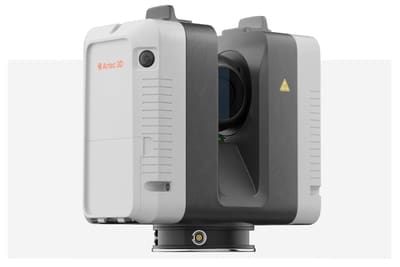
One of the best high-end scanners is the recently introduced Artec Ray II. This scanner combines its lightweight build with impressive accuracy, enabling it to easily scan large objects like buildings, bridges, wind turbines, you name it. Together with the tripod, the unit weighs just 5 kilograms.
The ArtecRay II can capture points at a phenomenal rate of 2 million points per second and is flexible enough to capture points from objects as close as half a metre and up to 130 metres away. It also has a remote scanning function that allows the scanner to be controlled remotely. Sells for approximately US$65,000.
Faro Focus Premium (Mid-range)
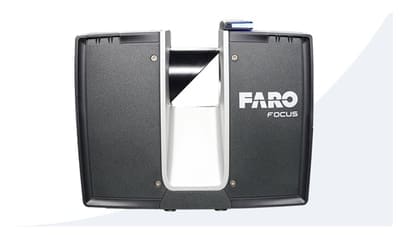
The Faro Focus Premium claims to be the fastest, most accurate and most data-sharing-enabled scanner on the market to date. It excels at capturing detailed and precise point clouds, making it ideal for large-scale construction projects and complex architectural documentation. It works well even in challenging lighting conditions. Something particularly useful about this scanner is its seamless integration with FARO’s software ecosystem, such as the Scene software for processing and managing scans.
This model has a 70 metre scanning range but with the option range extension you can boost that to 350m. It has a scanning rate of 2 million points per second and accuracy of 2mm at 10m. Sells for approximately US$42,000.
Matterport Pro3 (Low-end)

The Matterport Pro3 bridges the gap between affordability and professional-grade performance. Designed for both indoor and outdoor environments, it has a range of up to 100 meters. One of its standout features is its ease of use, making it an attractive choice for users who may not be familiar with more complex scanning devices. The Pro3 integrates seamlessly with Matterport’s cloud platform, allowing users to quickly create, edit and share immersive 3D walkthroughs.
However, the Matterport Pro3 does have some limitations compared to higher-end LiDAR scanners. Though it offers solid performance for its price, its accuracy might not be sufficient for large-scale or highly detailed engineering projects where sub-millimeter precision is required. Sells for approximately US$6,000.
Best LiDAR Scanner Apps

The range of LiDAR scanning apps is limited, so their usefulness is consequently limited to scanning small areas like a single room rather than entire buildings. Still, if all you need to do is scan individual rooms, then it’s a handy option because you don’t need to buy any expensive equipment. It just sits there in your pocket ready to use whenever you like.
Know that to unlock these apps’ true LiDAR capabilities you will need a specific model of smartphone or tablet as most models do not come equipped with LiDAR scanning. A list of some LiDAR-equipped smartphones are in the table below. However, even if your phone isn’t quite smart enough to run LiDAR you can still do 3D scanning since some of these apps use other technology like photogrammetry to achieve the same, albeit less accurate, result.
| Android | iPhone |
|---|---|
| Samsung Galaxy S21 Ultra | iPhone 12 Pro (and more recent models) |
| Sony Xperia 1 III | iPhone 12 Pro Max (and more recent models) |
| Google Pixel 6 Pro | iPad Pro 2020 (and more recent models) |
Matterport
Matterport stands out in the realm of 3D scanning and virtual tours, making it a top choice for AEC and real estate professionals. The company also makes cameras with LiDAR such as the aforementioned Pro3. There’s a free version available, but for more capabilities you need a paid plan, which ranges from $9.99 to $269 (USD) per month. The app is available for both iOS and Android.
Polycam
Polycam is a robust 3D scanning app that supports both LiDAR and photogrammetry with a scan range of 10m. It offers fast, detailed, accurate scans, making it valuable for site documentation and design visualization. There’s both a limited free version and a Pro version for $17.99 (USD). Only available for iOS.
Scandy Pro
Scandy Pro delivers precise 3D models using LiDAR and photogrammetry. Its user-friendly interface and accuracy make it a handy tool to have, especially considering it is free. It’s only available for iOS though.
Scaniverse
Scaniverse is a versatile tool for 3D scanning as it supports LiDAR, Gaussian splatting and photogrammetry. It can be used to create high-quality virtual tours or to design intricate 3D projects. All processing is done right on your smartphone, so you can do unlimited processing for free without having to pay for a cloud subscription. Available for iOS and Android.

